Chrome on Windows, Linux, and macOS · Native Mac app
Stop opening GitHub just to see what changed.
See who’s waiting for your review, whether your PR passed CI, and who replied while you were coding. Check in from your Chrome toolbar or Mac menu bar.
Try either app free for 14 days. No card required.One lifetime license covers both.Finder
 Tue 9:41
Inbox
GitHub
Beta

Set it up once. Check in with one click.
- Add Cozy Watch to Chrome
Install it from the Chrome Web Store on Windows, Linux, or macOS.
- Connect GitHub
Your 14-day trial starts with your first successful connection.
- Pin it to your toolbar
Your reviews, PR status, and recent mentions are a click away.
02 / Menu Bar AppA quick glance.
A quick glance.
A clear next move.
Click the armchair to see your PRs, review states, and CI results in a compact panel.
- Check your own PRs or relevant team work.
- See what is approved, waiting, or needs a fix.
- Close the panel and return to what you were doing.
Need more context?
Use Dashboard to open the desktop overview preview below.

03 / Desktop AppGet the context.
Get the context.
Know what to do next.
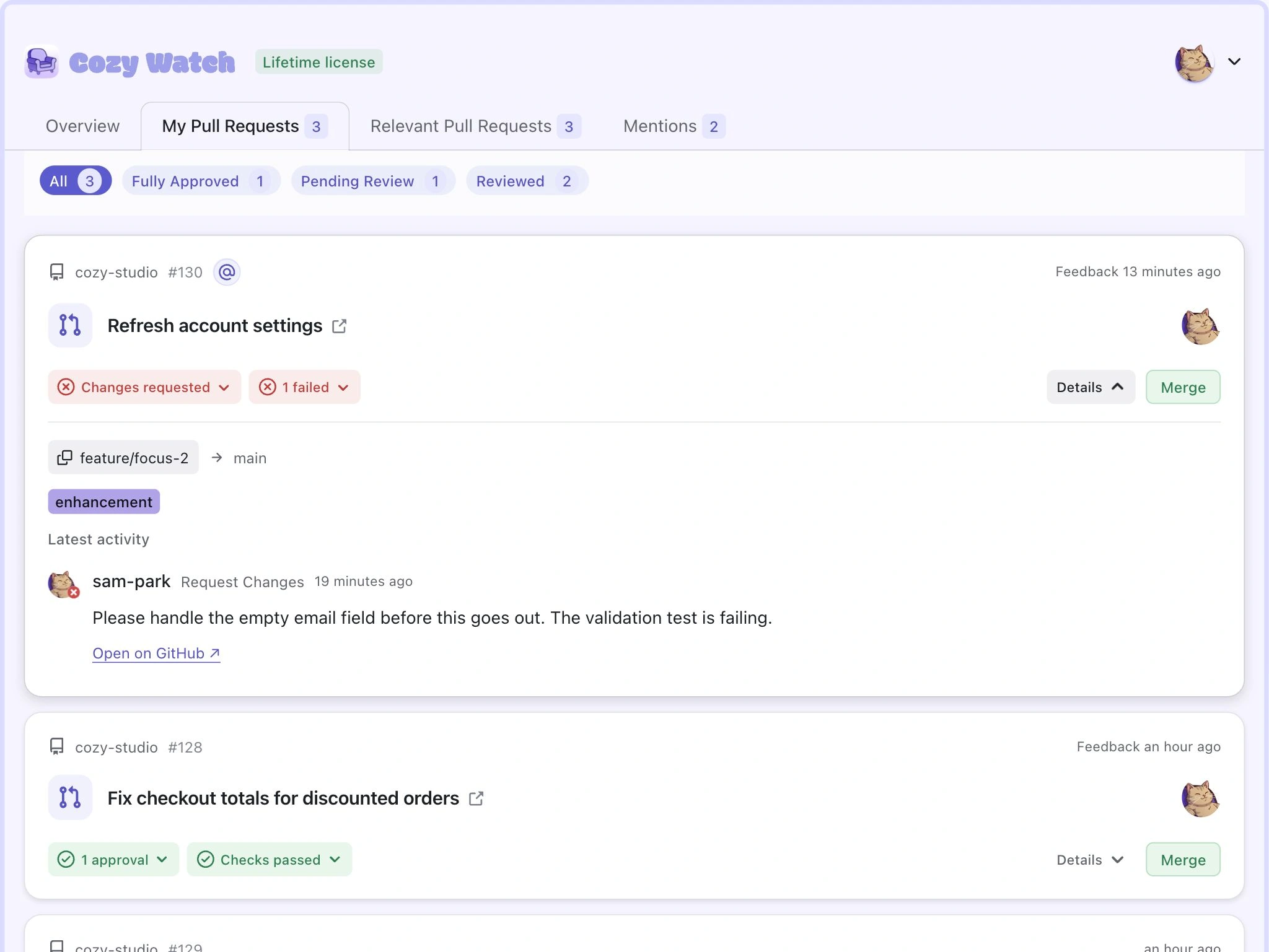
These are screenshots of the desktop app, with sample data. The notification tells you something changed. The menu bar gives you a quick look. Open the desktop app to read feedback, find mentions, and catch up on activity in one place.
Read the requested change alongside its branch, labels, and latest review. Know what to fix before you open GitHub.
One app. Three ways to stay on top of your work.
Get notified. Take a glance. Open the detail when you need it.
Explore all 9 product screenshots
Built for focused work.
Cozy Watch is open source. Explore how the Mac app and Chrome extension work on GitHub.Pay once. Stay in flow.
One lifetime license covers the Mac app and Chrome extension for personal and commercial use.Black Friday · Save $9$29$20once
Cozy Watch lifetime license
Use code
Planned regular price: $49. No subscription or renewal.BF2026 at checkout.$9 off the $29 lifetime license. Ends November 30, 2026, 11:59 pm Pacific.One person, on 2 Macs
Personal and commercial use
Every desktop feature
Chrome extension (beta)
All future desktop updates
Saved lifetime activation works offline
Deactivate a Mac to move your license
A few things to know.
Can I use Cozy Watch on Windows or Linux?
Yes. The Chrome extension is in beta and works on Windows, Linux, and macOS. It’s included in your Cozy Watch lifetime license. You can use the same key in Chrome and still activate the desktop app on two Macs.
Can I use it for work?
Yes. The same license covers personal and commercial use for one person on 2 Macs.
What does lifetime include?
The Mac app, all future desktop updates, and the Chrome extension are included. Future hosted services would be separate purchases.
When does my trial start?
Your 14-day trial starts after your first successful GitHub connection. Every feature is included.
What happens when the trial ends?
Monitoring and GitHub notifications pause until you activate a license. Your accounts, preferences, and cached data stay in place.
Can I move my license to another Mac?
Yes. Deactivate the old Mac from Settings → License, then activate your license on the new one.
Does it work offline?
Activate your license online first. A valid saved lifetime activation keeps working offline and during temporary licensing-service outages. Fetching new GitHub activity needs an internet connection.
Is Cozy Watch still open source?
Yes. Source code and build instructions are available on GitHub. You can build the community version yourself, or buy the ready-to-install official app.
Shipping improvements, in the open.
Cozy Watch keeps getting better, so your workflow does too.
Cozy Watch GitHub Notifications Overview
Cozy Watch delivers real-time GitHub notifications in your macOS menu bar, helping you track pull requests, reviews, and CI status without opening GitHub or losing focus.
- Receive real-time GitHub notifications directly on your desktop via a clean macOS menu bar app interface.Feature
- Easily monitor pull requests, reviews, and CI/CD build status without needing to open GitHub or check emails.Feature
- The app runs discreetly in the system tray to minimize distractions and help maintain focus.Feature
- Your workflow stays private and secure since Cozy Watch connects only to GitHub and does not send data elsewhere.Feature
Powered by ReleaseView
As seen on Uneed
See what the community thinks of Cozy Watch.
Be first to hear what’s next.
Get release notes for the Mac app and Chrome beta, plus occasional Cozy Watch updates.Spend less time checking GitHub.Download